
Benchmarks
This page records local benchmark results for the official Anvil HTTP drivers. It is a measurement report, not a portability guarantee. Run the same command on your own target hardware before using these numbers for capacity planning.
How To Read The Numbers
Section titled “How To Read The Numbers”For the live-server results below, one operation is one completed HTTP request over a real TCP connection to a running local server.
| Metric | Meaning |
|---|---|
| Requests/sec | Completed HTTP requests per second during the measured window. |
| p50 | Half of completed requests finished at or below this latency. |
| p95 | 95% of completed requests finished at or below this latency. |
| p99 | 99% of completed requests finished at or below this latency. |
| Errors | Requests that returned the wrong status, missed an expected header, or failed at the client. |
Go microbenchmarks use different terms:
| Metric | Meaning |
|---|---|
ns/op | Nanoseconds per in-process benchmark operation. |
B/op | Heap bytes allocated per operation. |
allocs/op | Heap allocation count per operation. |
Microbenchmarks are useful for driver overhead and regressions. Live-server benchmarks are better for user-facing throughput and latency discussion.
Workload
Section titled “Workload”The live workload uses the same generated-style sdk.HTTPRoute shape for each
driver:
POST /projects/:projectID/events?tenant=acme&include=audit- Route parameter read:
projectID - Query read:
tenant - Header read:
X-Request-ID - Middleware before hook writes request-local state
- Middleware after hook writes
X-Benchmark-After - JSON body decode
- Validation-style checks for required fields
- Deterministic checksum work with SHA-256
- JSON response encode
The request body is:
{ "name": "deploy", "quantity": 7, "tags": ["api", "bench", "native"], "metadata": { "region": "eu", "tier": "gold", "source": "livebench" }}Command
Section titled “Command”Run from the anvil-http/benchmarks module:
go run ./cmd/livebench ` -drivers native,std,fiber ` -concurrency 16,64,256 ` -repeats 3 ` -warmup 2s ` -duration 10s ` -out artifacts/livebench/20260606-project-workThe runner starts one driver at a time on 127.0.0.1, warms it up, measures the
selected concurrency level, shuts it down, and then moves to the next driver.
Drivers are interleaved by repeat and concurrency to reduce time-order bias.
Environment
Section titled “Environment”| Field | Value |
|---|---|
| Date | 2026-06-06 |
| OS/Arch | Windows / amd64 |
| Go | go1.26.4 |
| CPU | AMD Ryzen 9 7950X3D 16-Core Processor |
| Logical CPUs | 32 |
| Scenario | project-work |
| Warmup | 2s per driver/concurrency/repeat |
| Measurement | 10s per driver/concurrency/repeat |
| Repeats | 3 |
Throughput
Section titled “Throughput”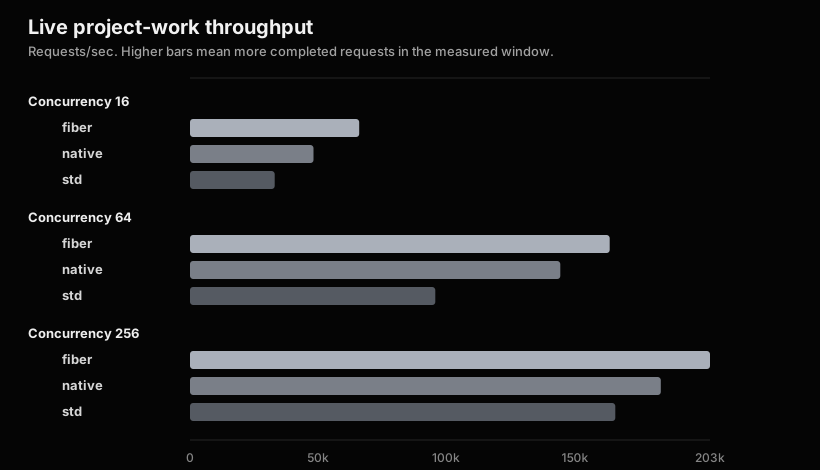
Requests/sec values are averages across repeats, rounded to whole requests.
| Driver | Concurrency | Repeats | Requests/sec | Errors |
|---|---|---|---|---|
| fiber | 16 | 3 | 66,030 | 0 |
| native | 16 | 3 | 48,193 | 0 |
| std | 16 | 3 | 33,042 | 0 |
| fiber | 64 | 3 | 163,732 | 0 |
| native | 64 | 3 | 144,488 | 0 |
| std | 64 | 3 | 95,715 | 0 |
| fiber | 256 | 3 | 202,885 | 0 |
| native | 256 | 3 | 183,685 | 0 |
| std | 256 | 3 | 165,935 | 0 |
Latency
Section titled “Latency”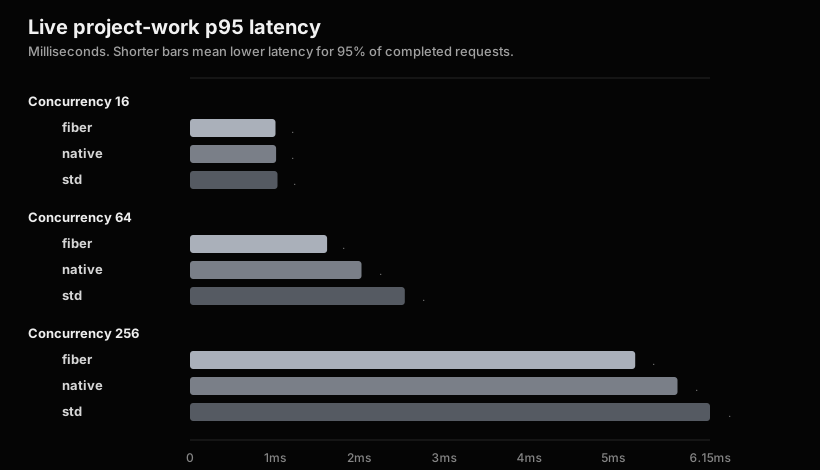
| Driver | Concurrency | p50 ms | p95 ms | p99 ms |
|---|---|---|---|---|
| fiber | 16 | 0.000 | 1.010 | 1.218 |
| native | 16 | 0.302 | 1.018 | 1.521 |
| std | 16 | 0.505 | 1.034 | 1.528 |
| fiber | 64 | 0.000 | 1.620 | 2.559 |
| native | 64 | 0.000 | 2.027 | 2.840 |
| std | 64 | 0.504 | 2.539 | 3.892 |
| fiber | 256 | 0.504 | 5.261 | 7.666 |
| native | 256 | 0.504 | 5.761 | 8.459 |
| std | 256 | 0.504 | 6.145 | 9.741 |
Some p50 values round to 0.000ms on this Windows run because many local
keep-alive requests completed below the displayed millisecond precision. Use
p95 and p99 when comparing latency behavior from this report.
These results describe one local run. They can move with CPU scheduling, power profile, background processes, Go version, driver version, and workload shape.
The useful information is the shape of the results: how each driver behaves as concurrency rises, and which latency percentile matters for the application you are sizing.